Joshua R. Dapitillo

Remote · UTC+8

Issue Nº 01 Portfolio · 2026 JRD · 0001

Joshua R. Dapitillo, creative technologist: Design the idea. Build the thing. Automate the rest.

In which I turn creative ideas into functional digital experiences.

I'm Joshua R. Dapitillo, a web designer and developer who also builds the systems behind the page. I design in Figma, build in WordPress and code, and connect the forms, CRMs and automations that keep a site working after launch.

  • Web design
  • WordPress & frontend
  • AI automation
  • Graphic design

Toolkit

  • Figma
  • Photoshop
  • Lightroom
  • Premiere Pro
  • Canva
  • WordPress
  • Elementor
  • Divi
  • HTML
  • CSS
  • JavaScript
  • React
  • VS Code
  • Shopify
  • ClickFunnels
  • Make
  • ActiveCampaign
  • Claude
  • ChatGPT
  • Gemini
An automation: a form sends a webhook to the CRM, which starts the follow-up and notifies the team.

Chapter one

Selected work

Pages, sites, campaigns and apps, mostly for German-speaking brands.

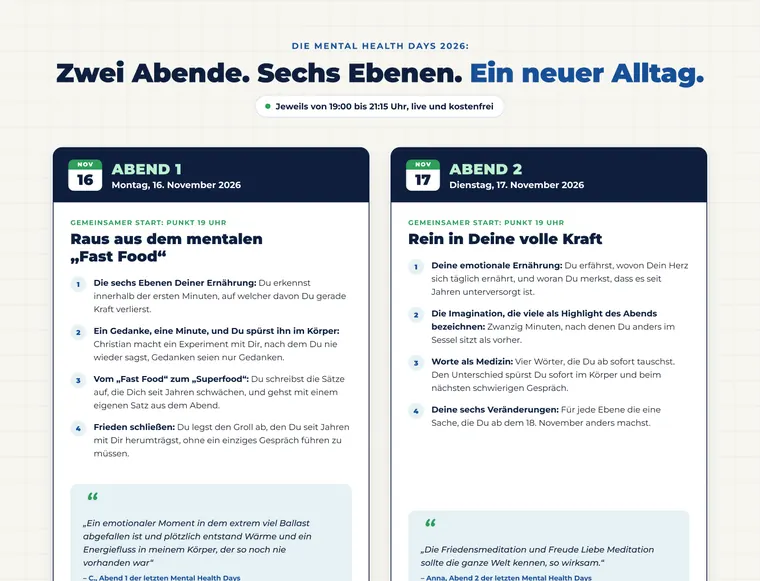
mental-health-days · desktop 1440
Mental Health Days 2026: top of the page

Hover to scroll the full page

No. 01Landing page · Event opt-in

Mental Health Days 2026

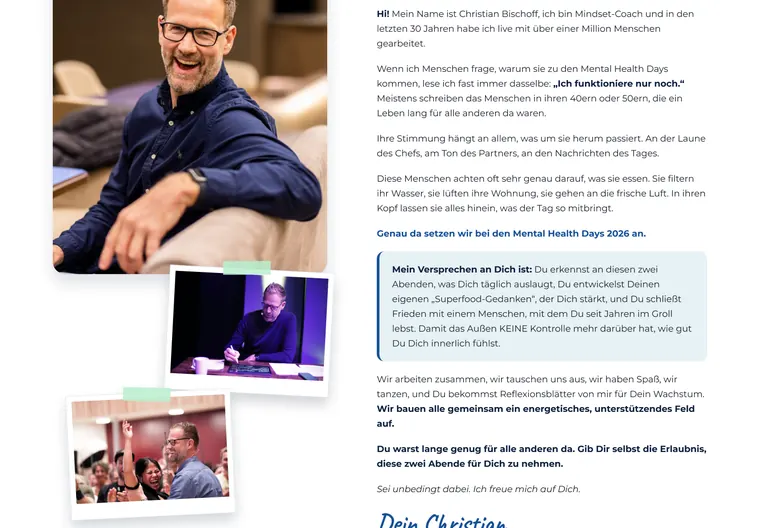
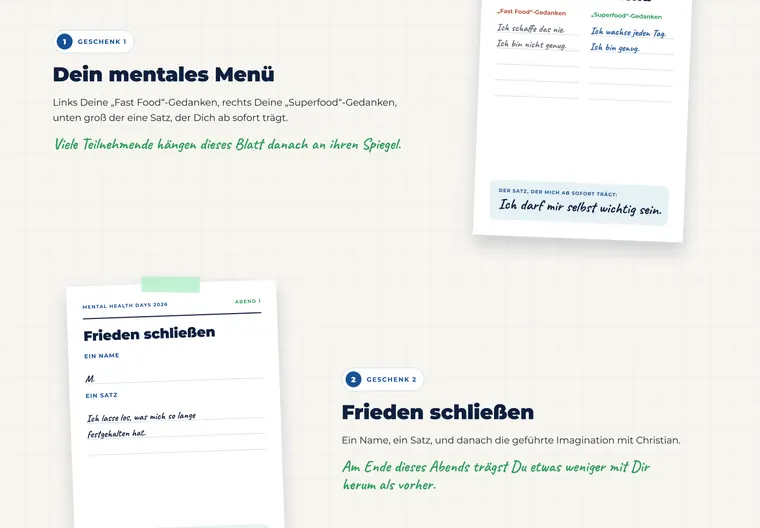
Opt-in page for a free two-evening live event, designed as a warm, hand-annotated notebook instead of a hard-sell webinar page.

Client
Christian Bischoff via GROW HQ
Role
Page design in Figma, WordPress build
Tools
  • Figma
  • WordPress
Year
2026
Read the case: Mental Health Days 2026
  1. Two evenings, side by side: the program as two cards.
    aTwo evenings, side by side: the program as two cards.
  2. The host intro, told with photos and a personal letter.
    bThe host intro, told with photos and a personal letter.
  3. Free bonuses presented as taped worksheet notes.
    cFree bonuses presented as taped worksheet notes.
No. 02Website · Homepage redesign

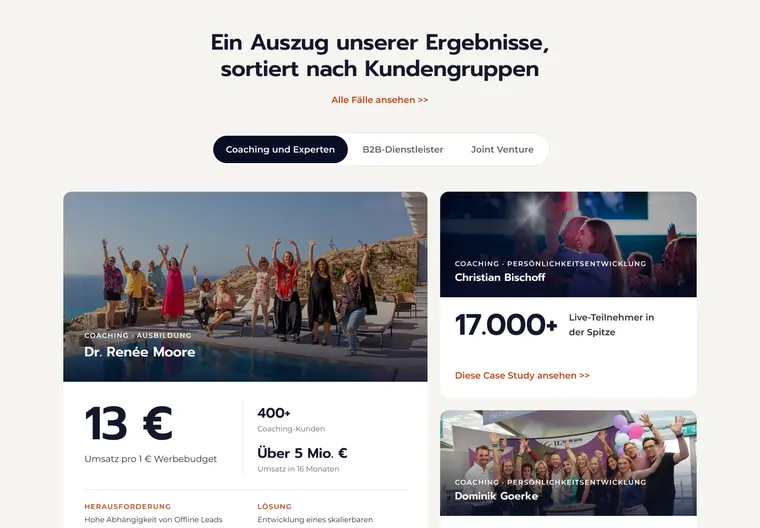
GROW HQ Homepage

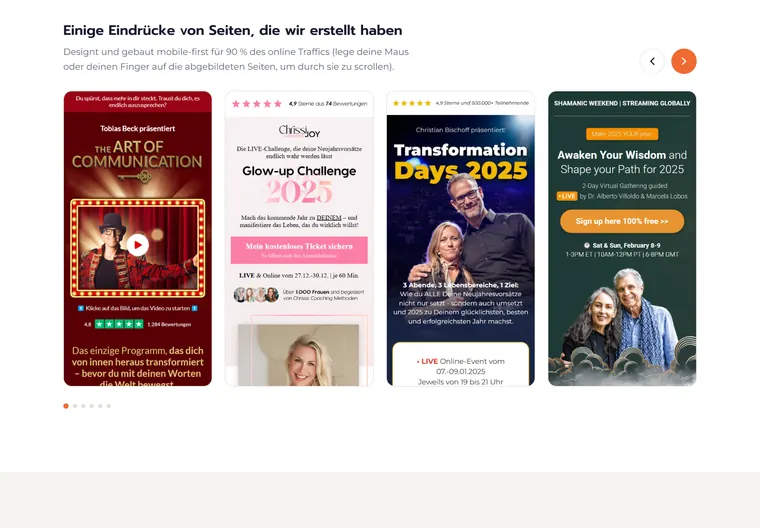
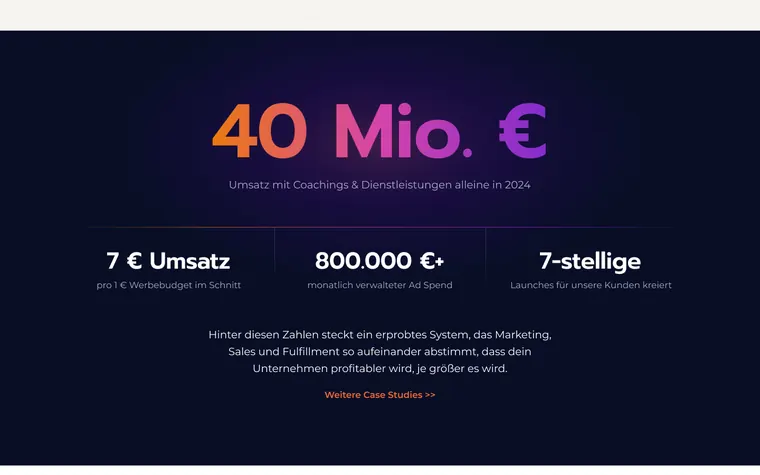
A redesign of the agency's own homepage: dark, numbers-first, and built to route three very different audiences to the right offer.

grow-hq-homepage · v2
GROW HQ Homepage: top of the page
  1. Results sorted by client type, with filter tabs.
    aResults sorted by client type, with filter tabs.
  2. A carousel of landing pages built for clients.
    bA carousel of landing pages built for clients.
  3. The big-number moment, in the brand gradient.
    cThe big-number moment, in the brand gradient.
Client
GROW HQ GmbH
Role
Homepage design (v2) in Figma
Tools
  • Figma
Read the case: GROW HQ Homepage

Nos. 03 to 05 · Mobile sales pages

Made for the small screen.

Three long-form sales and event pages, shown as their phone layouts. Each one has its own brand world; all of them keep one action obvious.

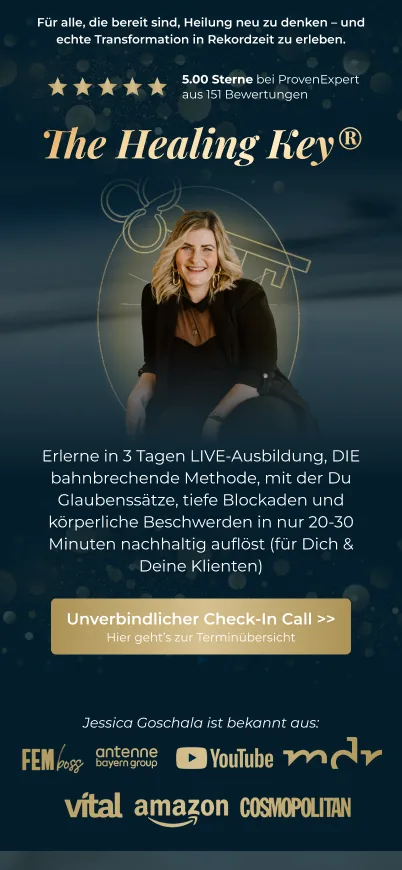
  • The Healing Key®: first screen on a phone

    No. 03Sales page · Mobile

    The Healing Key®

    Jessica Goschala · 2025

    Long-form sales page for a three-day live training, in deep navy and gold to feel calm, premium and trustworthy.

  • The New Me: first screen on a phone

    No. 04Sales page · Mobile

    The New Me

    Chrissi Joy · 2025

    Sales page for a 90-day coaching program: soft pink and cream, photo-led, with a clear path from story to offer.

  • Miracle Life Days: first screen on a phone

    No. 05Event page · Mobile

    Miracle Life Days

    Susanne & Nicole · 2026

    Registration page for a free 13-day online event for women, in ivory, deep teal and gold with an editorial serif voice.

No. 06Website · Service landing page

TacticWorks

One-page site for an external COO service that sets up Notion for agencies, online shops and coaches.

Client
TacticWorks via GROW HQ
Role
Page design in Figma, WordPress build
Tools
  • Figma
  • WordPress
Read the case: TacticWorks
tacticworks · desktop 1440
TacticWorks: top of the page

No. 07Graphic design · Paid social ads

Webinar Ad Series

Square ad creatives for a dog-behaviour webinar: two concept families, eleven variants, each leading with a different hook.

Client
Mirjam Cordt via GROW HQ
Role
Ad concepts and design in Figma
Tools
  • Figma
See all variants: Webinar Ad Series
Ad variant 1. Hook: distance. A dashed circle marks the dog that has not arrived yet.
Ad variant 2. Hook: a stress gauge from 'survival' to 'arrived'.
Ad variant 3. Hook: the expert, with her own dog.
Ad variant 4. Myth family: photos with stamp labels.
Ad variant 5. Myth family: quote headline and a handwritten callout.

Legend

  1. 1Hook: distance. A dashed circle marks the dog that has not arrived yet.
  2. 2Hook: a stress gauge from 'survival' to 'arrived'.
  3. 3Hook: the expert, with her own dog.
  4. 4Myth family: photos with stamp labels.
  5. 5Myth family: quote headline and a handwritten callout.

No. 08Automation · AI workflows

AI Automation Line Map

Five production workflows I run at GROW HQ, drawn as a transit map. Each line starts with one command and ends with something delivered: a report, a scheduled video, an edited cut, a podcast post or an action list from a video briefing.

Automation line map: 5 workflows starting from Claude Code Webinar report: Recording, Local Whisper, Transcript QA, Filed to Drive, Funnel KPIs, Sheets report, Notion. YouTube publishing: Final render, Local Whisper, Titles from transcript, Approval, Upload + schedule, Podcast episode, Notion. Video editing: Raw footage, Local Whisper, Cut plan, Render, Subtitles + overlays, QA: sync + frames, Delivered to Drive. Podcast to WordPress: Podigee episodes, WordPress post, Live on the client site. Loom to action list: Loom link, Video + transcript, Frame every 5 s, Timecoded action list. RecordingTranscript QAFiled to DriveFunnel KPIsSheets report Final renderTitles from transcriptApprovalUpload + schedulePodcast episode Raw footageCut planRenderSubtitles + overlaysQA: sync + framesDelivered to Drive Podigee episodesWordPress postLive on the client site Loom linkVideo + transcriptFrame every 5 sTimecoded action list Local Whisper transcripts on the Mac Notion task for the team Claude Code one command per line Lines L1 Webinar report L2 YouTube publishing L3 Video editing L4 Podcast to WordPress L5 Loom to action list
Hover a line or its legend entry to follow it.Swipe sideways to see the whole map.
  1. L1Webinar report Turns a recorded client webinar into a filed transcript and a funnel KPI report.
  2. L2YouTube publishing Takes a finished video from render to a scheduled upload, with a podcast episode alongside.
  3. L3Video editing Cuts long-form, testimonial and ad videos with subtitles and animated overlays.
  4. L4Podcast to WordPress Publishes podcast episodes as posts on a client's WordPress site.
  5. L5Loom to action list Turns a Loom briefing or feedback video into a timecoded action list, with a screenshot for every point, so nobody has to rewatch it.
Client
GROW HQ GmbH
Role
Workflow design and build, run with Claude Code
Tools
  • Claude Code
  • Whisper (local)
  • ffmpeg
  • Google Sheets API
  • Notion API
  • YouTube Data API
  • Podigee API
  • Loom
  • WordPress
Year
2026
Ride the lines: AI Automation Line Map

Nos. 09 to 10 · Personal products

Apps I designed and built.

Two iOS apps of my own, from first idea to real phones. One is on TestFlight, the other is heading for a public beta. Product, interface and code, start to finish.

No. 09Mobile app · iOS

Recall

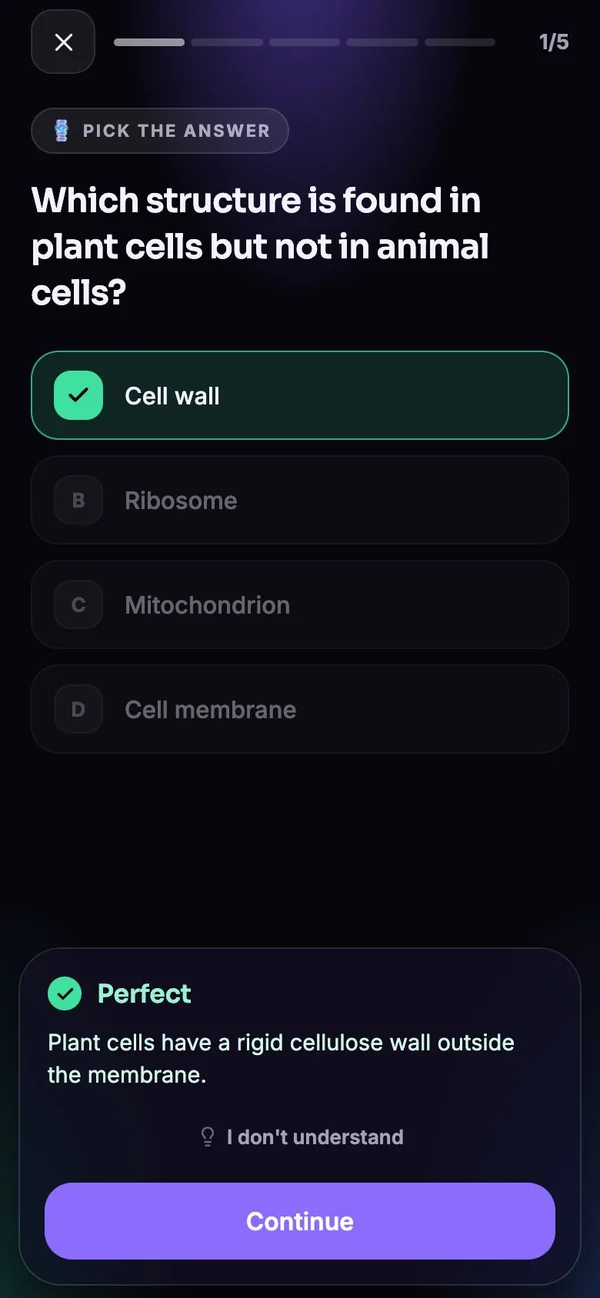
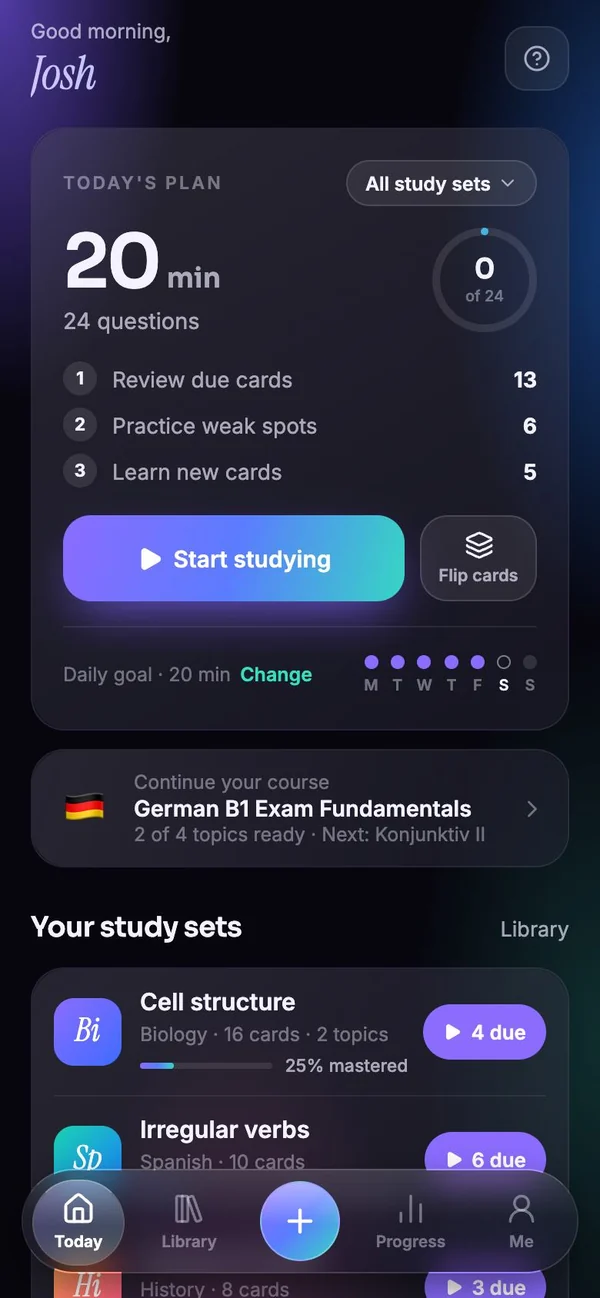
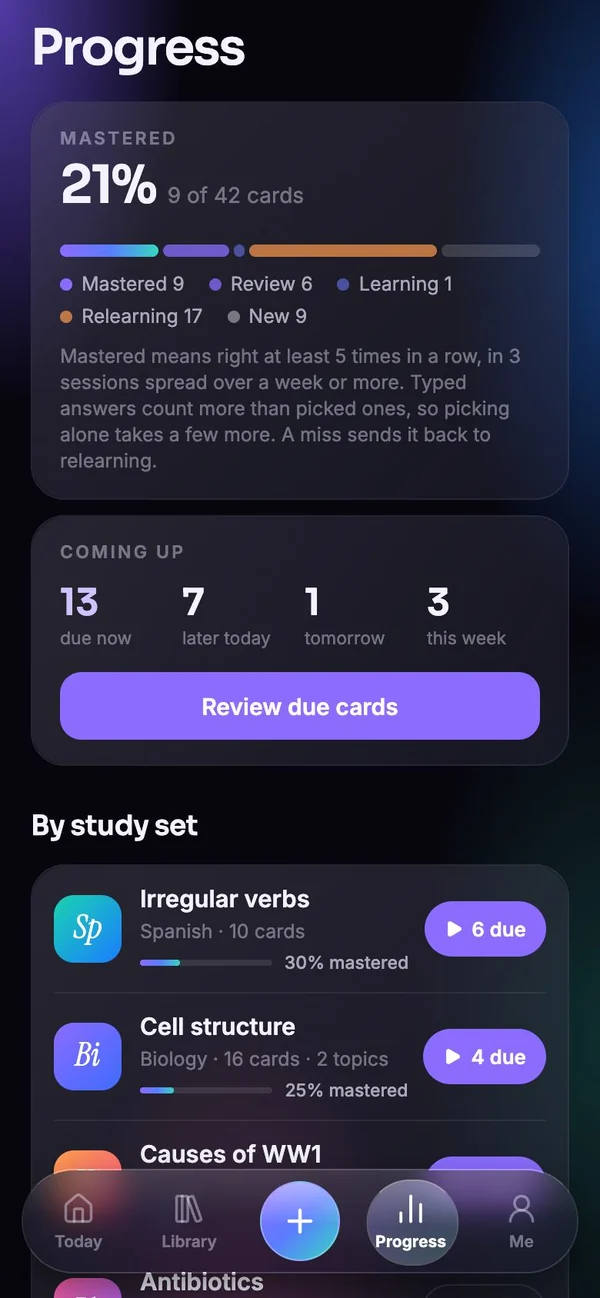
A study app that turns your own notes, PDFs and photos into practice questions, then schedules reviews until you actually remember the material.

Client
Own product
Role
Product, UX and build, AI-assisted with Claude Code
Tools
  • Expo
  • React Native
  • TypeScript
  • Claude API
  • Railway
Year
2026
See all the screens: Recall
Recall: Smart review: one question at a time, with instant feedback and an explanation.
Recall: Today: a plan built from real numbers, due cards, weak spots and new cards.
Recall: Progress: mastery across five learning states and what comes due.

No. 10Mobile app · iOS

Wayback

A privacy-first iPhone app that rebuilds where you have been from the dates and locations in your photos, and plays your travels back on a map.

Client
Own product
Role
Product, UX and build, AI-assisted with Claude Code
Tools
  • Expo
  • React Native
  • TypeScript
  • Swift
  • Apple Maps
  • SQLite
Year
2026
See all the screens: Wayback
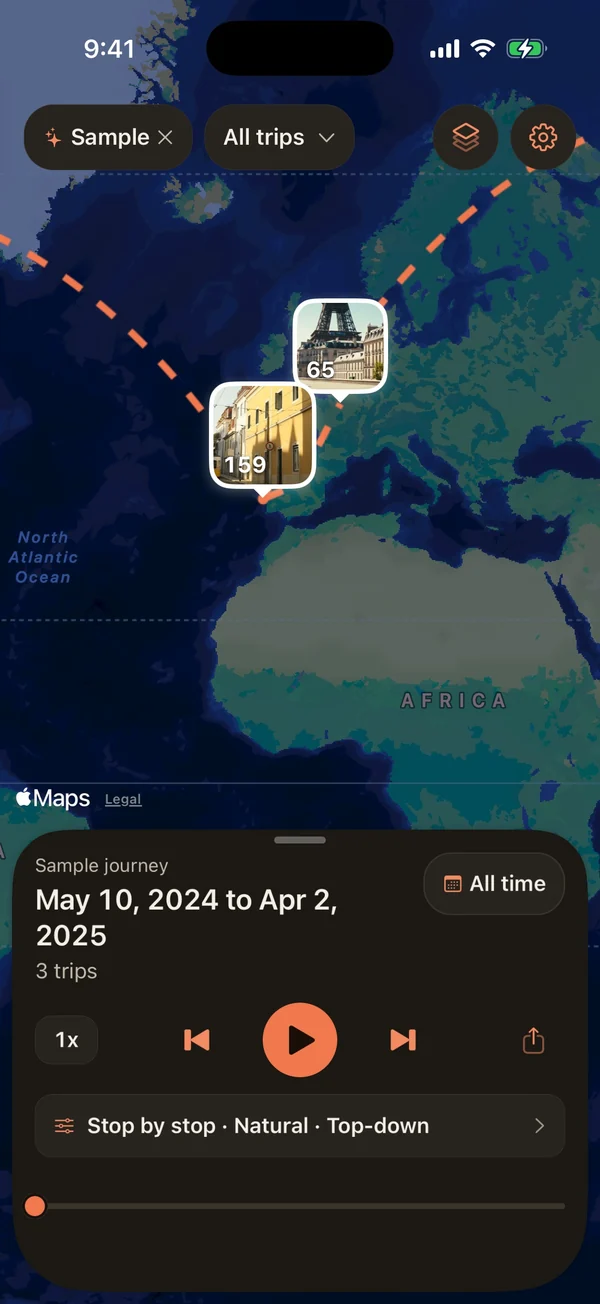
Wayback: The sample journey on the map: places as photo tiles, trips joined by dashed arcs.
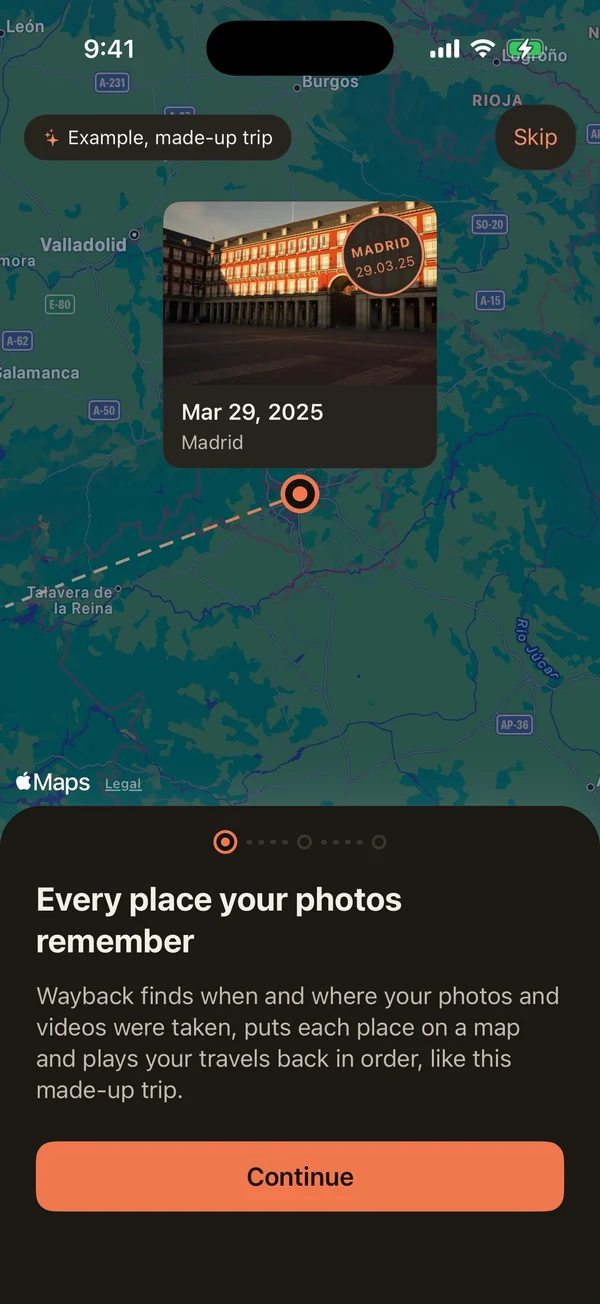
Wayback: Onboarding: a made-up sample trip plays on the real map behind the card, with a postcard at every stop.
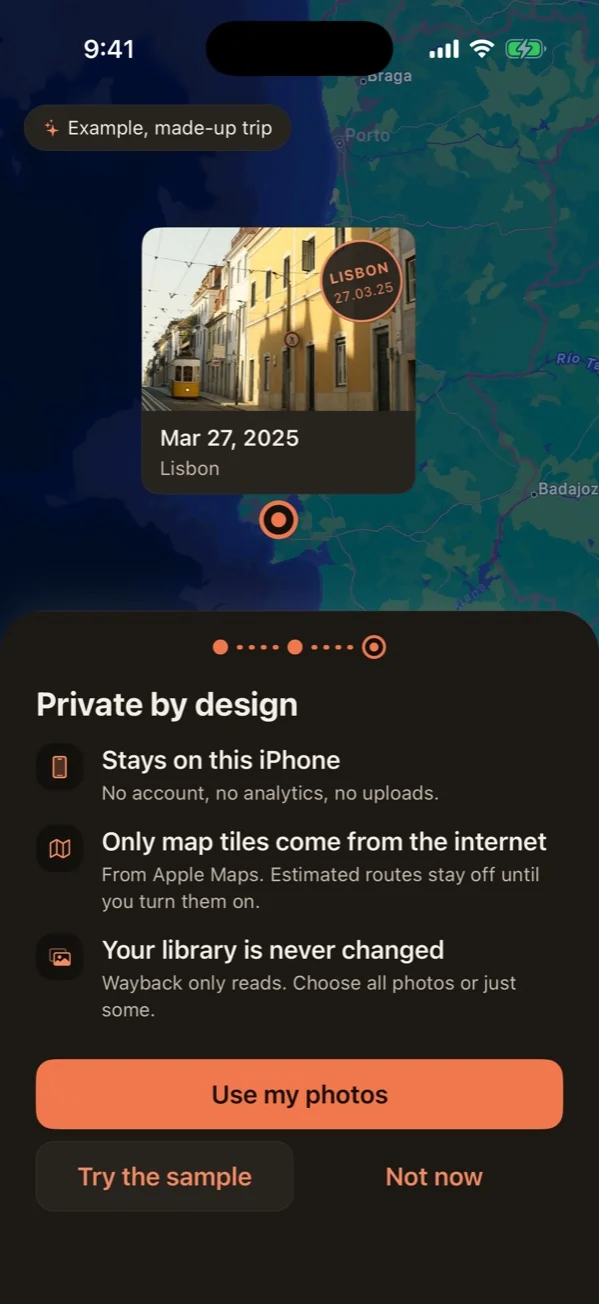
Wayback: Private by design: no account, no analytics, no uploads, and the photo library is never changed.

Chapter two

What I can do

Four skills, one workflow: fewer handoffs, less lost in between.

  1. 01Design
  2. 02Build
  3. 03Automate
  4. 04Products

Usually where a project starts.

Design & Visual Communication

Pages and campaigns that look considered rather than templated, and stay on brand across every format.

  • Web design and UI/UX
  • Graphic design
  • Branding and visual communication
  • Creative direction and digital content
  • Social media design and management
  • Image editing and visual production
Tools
  • Figma
  • Photoshop
  • Lightroom
  • Canva

Seen inWebinar Ad Series, Mental Health Days 2026, The Healing Key®

Where the design meets a real browser.

Web Development

Designs that survive the real browser: responsive, easy for the team to edit, and looked after once they are live.

  • HTML, CSS and JavaScript
  • React and frontend development
  • Responsive website builds
  • WordPress with Elementor and Divi
  • Landing page implementation
  • Integrations, maintenance and troubleshooting
  • ClickFunnels and Shopify
Tools
  • HTML
  • CSS
  • JavaScript
  • WordPress
  • Elementor
  • Divi
  • React
  • VS Code
  • ClickFunnels
  • Shopify

Seen inMental Health Days 2026, TacticWorks, Miracle Life Days

Where a website stops being a brochure.

Automation & Digital Systems

The form is not the finish line. Leads land in the right place, follow-ups run on their own, and repetitive work gets smaller.

  • AI-assisted workflows and automation
  • Lead capture forms and integrations
  • Workflow optimisation
  • Process improvement
Tools
  • Make
  • ActiveCampaign
  • ChatGPT
  • Gemini
  • Claude

Seen inAI Automation Line Map

Where side projects turn into products.

Digital Products & Creative Technology

From an idea to something people can open and use: prototypes, small apps and the tooling around them.

  • Mobile app development and publishing
  • Interface prototyping
  • Digital product experiments
  • Video and photo editing
Tools
  • Figma
  • VS Code
  • Premiere Pro
  • Lightroom

Seen inRecall, Wayback

Every tool listed has been used on real work. Depth varies, so ask me about any of them.

Chapter three

Origin story

From a call-centre headset to design, code and automation.

Portrait of Joshua R. Dapitillo Our hero
Joshua R. Dapitillo Creative Technologist
Where it started

I started on the phones, answering customer questions at Concentrix. Then I drew T-shirts and graphics for freelance clients, moved into building websites as a frontend developer, and kept going until design and code became one job.

  1. Calls
  2. Tees
  3. Sites
  4. One job
Today

Today I work at GROW HQ, a German agency for marketing, sales and processes. I design and build WordPress sites and landing pages, produce the graphics around them, and set up the automations, lead capture and integrations that keep them working after launch.

Daily kit

  • WordPress
  • Elementor
  • Figma
  • Photoshop
  • Make
  • ActiveCampaign
  • Claude
Along the way

German
Beagle Academy

Along the way I studied German to B1, which helps: most of the brands I design for speak it.

The lesson

The hardest part of a project is rarely the code.

It is understanding what someone actually needs, then making the design, the build and the system behind it agree with each other.

The story so far, in six panels

  1. 2021–22

    Concentrix

    Customer Service Representative

    Handled customer inquiries and found solutions, call after call.

  2. 2022–23

    Freelance

    Graphic & T-shirt Designer

    Custom designs from client briefs.

  3. 2022–23

    Freelance

    Web Designer & Frontend Developer

    Websites in HTML, CSS, JavaScript, React and Vue.

  4. 2023–24

    Beagle Academy · German client

    German B1 · Admin Assistant

    Studied German to B1 while handling schedules, records and confidential reports for a German client.

  5. 2024

    Green Home Improvement+

    Web Designer & Frontend Developer

    Figma page designs and builds, together with a U.S. development team.

  6. Now

    2024–now

    GROW HQ GmbH

    Web Designer, WordPress Developer, Graphic Designer & Digital Solutions Specialist

    WordPress sites, landing pages, graphics, AI automations, lead capture and integrations. Also developed and published mobile apps.

Chapter four

How I work

A typical flow, not a rigid formula. Every project bends it a little.

  1. 01

    Understand the problem

    What has to change, for whom, and how we will know it worked. Before any pixels.

  2. 02

    Explore the direction

    Rough layouts, references and a visual idea worth committing to.

  3. 03

    Design and build

    Figma first, then WordPress or code, checked on real screens as it grows.

  4. 04

    Connect the systems

    Forms, CRM, email and automations, so a sign-up actually goes somewhere.

  5. 05

    Test, improve, deliver

    Responsive checks, speed, broken links and the small details, then launch and follow up.

Back cover

Got a good idea? Let's make it real.

Tell me what you are trying to build, fix or automate. A few sentences are plenty to start.

What is it about?

This opens your own email app with the message filled in. Nothing is sent from this website.